Bringing Open WebUI to OpenShift

Open WebUI on OpenShift, connected to RHAIIS and Hermes Agent over the cluster-internal service network — AI generated
Introduction
In this post, I want to describe how to deploy Open WebUI on OpenShift and connect it to inference endpoints running on the same cluster. This is a continuation of two earlier posts: Running the Red Hat AI Inference Server on OpenShift , which covers the model-serving layer, and Deploying Hermes Agent on OpenShift , which adds an agent layer on top of it.
Both of those posts included a section on connecting to Open WebUI. In both cases, the connection went from an Open WebUI instance running in my homelab to the newly deployed OpenShift endpoints via their public routes. It works, but it requires the inference endpoints to be reachable from outside the cluster, and the API keys to travel across the public internet. Running Open WebUI on the same OpenShift cluster removes that requirement. The connection from Open WebUI to RHAIIS and Hermes goes over the internal cluster service network using Kubernetes DNS names. Neither backend needs a public Route for this to work.
Running the interface on OpenShift also makes practical sense beyond network topology. A homelab instance works for personal use, but once more than a small group needs access, a platform that handles scaling and TLS termination without additional configuration is easier to operate.
Architecture
Open WebUI runs in a dedicated open-webui namespace. It connects to two backends over internal cluster DNS:
- RHAIIS, running in the
rhaiisnamespace, reachable atrhaiis-vllm.rhaiis.svc.cluster.local:8000 - Hermes Agent, running in the
hermesnamespace, reachable athermes.hermes.svc.cluster.local:8642
Both expose an OpenAI-compatible API. Open WebUI targets both through the OPENAI_API_BASE_URLS environment variable. The API keys in OPENAI_API_KEYS must be supplied in the same order as the URLs.
Open WebUI’s container image runs as UID 0 by default. OpenShift’s restricted SCC does not permit this, so the deployment uses a dedicated ServiceAccount bound to the anyuid SCC.
Prerequisites
- The RHAIIS deployment from the previous post
must be running in the
rhaiisnamespace with a deployment namedrhaiis-vllm. The RHAIIS API key is needed in a later step. - The Hermes deployment from the Hermes post
must be running in the
hermesnamespace. The Hermes API server key is needed in a later step. If you only want to connect RHAIIS, the Hermes parts can be skipped.
Deploying Open WebUI
All deployment files are available in the smichard/agent_on_ocp GitHub repository. The steps below apply them in sequence.
- Clone the repository:
git clone https://github.com/smichard/agent_on_ocp.git
cd open_webui_on_ocp
- Create the Namespace
oc new-project open-webui
- Create the ServiceAccount and SCC
The anyuid SCC allows a container to run as a specific user ID outside the default range. It does not grant host access or elevated kernel capabilities, but it does allow the root UID that Open WebUI requires.
The scc.yaml file creates both the ServiceAccount and the ClusterRoleBinding in one apply:
apiVersion: v1
kind: ServiceAccount
metadata:
  name: open-webui
  namespace: open-webui
  labels:
    app: open-webui
---
apiVersion: rbac.authorization.k8s.io/v1
kind: ClusterRoleBinding
metadata:
  name: open-webui-anyuid
subjects:
  - kind: ServiceAccount
    name: open-webui
    namespace: open-webui
roleRef:
  kind: ClusterRole
  name: system:openshift:scc:anyuid
  apiGroup: rbac.authorization.k8s.io
Apply the file to create the scc:
oc apply -f scc.yaml
- Create the Secrets
Two secrets are needed. The first holds the API keys for the two backend connections. The keys must be ordered to match the backend URLs that will be set in the deployment.
Retrieve the RHAIIS and Hermes API keys:
export RHAIIS_API_KEY=$(oc get secret vllm-api-key-secret -n rhaiis \
  -o jsonpath='{.data.VLLM_API_KEY}' | base64 -d)
export HERMES_API_KEY=$(oc get secret hermes-api-secret -n hermes \
  -o jsonpath='{.data.API_SERVER_KEY}' | base64 -d)
Create the API keys secret with both values, semicolon-separated:
oc create secret generic open-webui-api-keys \
  --from-literal=API_KEYS="${RHAIIS_API_KEY};${HERMES_API_KEY}" \
  -n open-webui
The second secret holds the session key Open WebUI uses to sign cookies and session tokens:
oc create secret generic open-webui-secret \
  --from-literal=WEBUI_SECRET_KEY=$(openssl rand -hex 32) \
  -n open-webui
- Create a PersistentVolumeClaim
Open WebUI stores its database, uploaded files, and user configuration on a persistent volume:
apiVersion: v1
kind: PersistentVolumeClaim
metadata:
  name: open-webui-pvc
  namespace: open-webui
  labels:
    app: open-webui
spec:
  accessModes:
    - ReadWriteOnce
  resources:
    requests:
      storage: 5Gi
Apply the file to create the PVC:
oc apply -f pvc.yaml
- Deploy Open WebUI
The Deployment sets OPENAI_API_BASE_URLS to the two internal service addresses, reads the API keys and session secret from the secrets created above, and mounts the PVC at /app/backend/data:
apiVersion: apps/v1
kind: Deployment
metadata:
  name: open-webui
  namespace: open-webui
  labels:
    app: open-webui
spec:
  replicas: 1
  selector:
    matchLabels:
      app: open-webui
  template:
    metadata:
      labels:
        app: open-webui
    spec:
      serviceAccountName: open-webui
      securityContext:
        runAsUser: 0
      volumes:
        - name: open-webui-data
          persistentVolumeClaim:
            claimName: open-webui-pvc
      containers:
        - name: open-webui
          image: ghcr.io/open-webui/open-webui:main
          imagePullPolicy: Always
          ports:
            - name: http
              containerPort: 8080
              protocol: TCP
          env:
            - name: OPENAI_API_BASE_URLS
              value: "http://rhaiis-vllm.rhaiis.svc.cluster.local:8000/v1;http://hermes.hermes.svc.cluster.local:8642/v1"
            - name: OPENAI_API_KEYS
              valueFrom:
                secretKeyRef:
                  name: open-webui-api-keys
                  key: API_KEYS
            - name: WEBUI_SECRET_KEY
              valueFrom:
                secretKeyRef:
                  name: open-webui-secret
                  key: WEBUI_SECRET_KEY
            - name: ENABLE_OLLAMA_API
              value: "false"
            - name: ENABLE_OPENAI_API
              value: "true"
          volumeMounts:
            - name: open-webui-data
              mountPath: /app/backend/data
          resources:
            requests:
              cpu: "500m"
              memory: "500Mi"
            limits:
              cpu: "1000m"
              memory: "2Gi"
      restartPolicy: Always
Apply the file to create the deployment:
oc apply -f deployment.yaml
- Create a Service and Route
Create a Service that maps port 8080 to port 8080 on the pod:
apiVersion: v1
kind: Service
metadata:
  name: open-webui
  namespace: open-webui
  labels:
    app: open-webui
spec:
  selector:
    app: open-webui
  ports:
    - name: http
      protocol: TCP
      port: 8080
      targetPort: 8080
Create a TLS-terminated Route to expose the Open WebUI interface outside the cluster:
apiVersion: route.openshift.io/v1
kind: Route
metadata:
  name: open-webui
  namespace: open-webui
  labels:
    app: open-webui
spec:
  to:
    kind: Service
    name: open-webui
  port:
    targetPort: http
  tls:
    termination: edge
    insecureEdgeTerminationPolicy: Redirect
Apply both and retrieve the assigned hostname:
oc apply -f service.yaml
oc apply -f route.yaml
oc get route open-webui -n open-webui -o jsonpath='{.spec.host}'
First Login and Verifying Connections
Open the hostname from the previous step in a browser. On first launch, Open WebUI prompts for an admin account. The first account created becomes the administrator.
To verify that both backends are reachable, go to Settings > Connections in the admin panel. Each entry should show a green status indicator. If a connection shows an error, check that the corresponding deployment is running and that the API key in open-webui-api-keys matches the key currently in use on that backend.
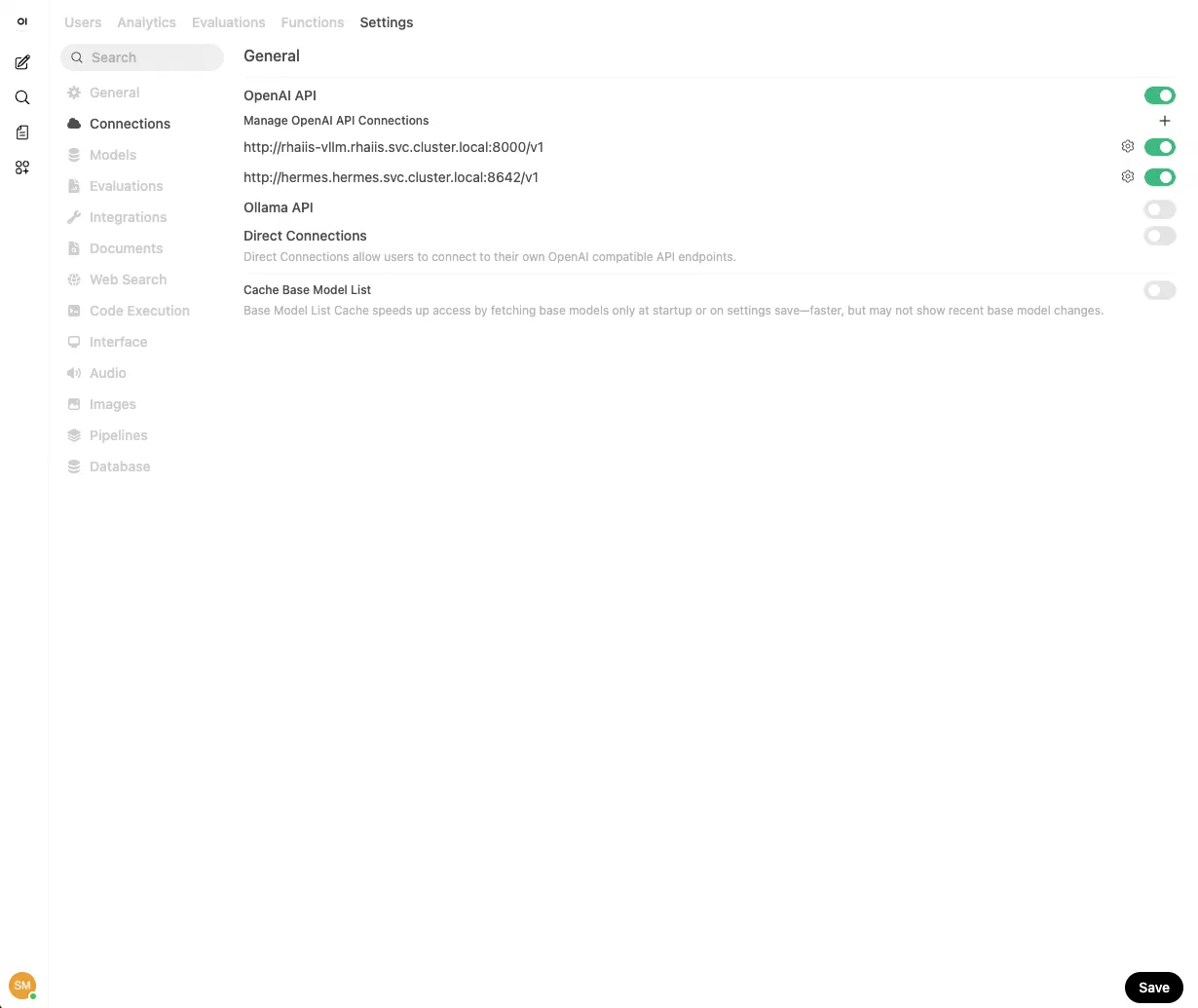
Open WebUI Settings > Connections panel showing both the RHAIIS and Hermes Agent connections active
Once both connections are active, models from both backends appear in the model selector on the main chat screen. The list is fetched from each backend’s /v1/models endpoint.
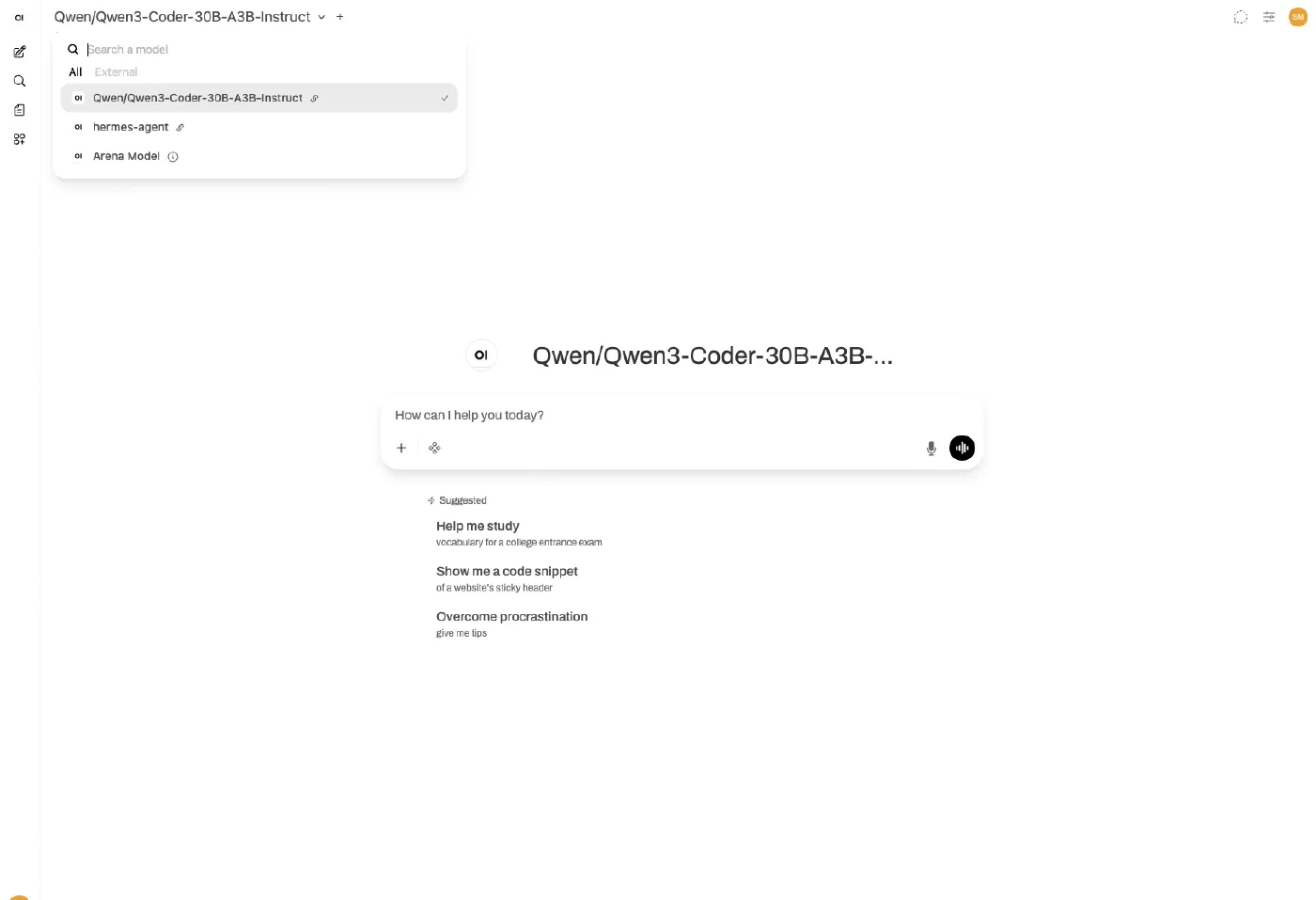
Model selector in Open WebUI showing models from RHAIIS and Hermes Agent
Conclusion
This setup runs Open WebUI on the same OpenShift cluster as the model and agent backends. Traffic between Open WebUI and RHAIIS, and between Open WebUI and Hermes, stays on the cluster-internal service network. The public OpenShift Route is used only for the browser-facing Open WebUI interface. Neither RHAIIS nor Hermes requires a public Route for this to work, which avoids exposing inference endpoints outside the cluster.
The three deployments form a self-contained AI stack on OpenShift: a model server, an agent layer, and a browser interface, each in its own namespace and each reachable from the others through standard Kubernetes service discovery.
References
Author: Dr. Stephan Michard
Words: 1242